


Page 25 - FF2425
P. 25
INITIATIVES

             Sarawak Education Enhancement
                  Programme (SEEP)


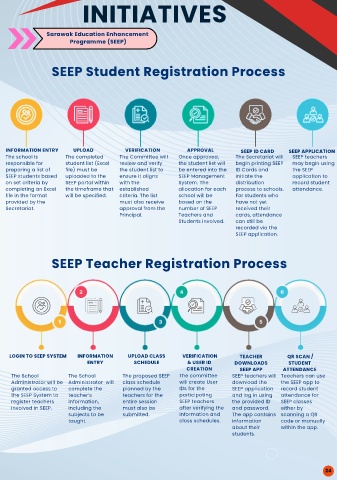
              SEEP Student Registration Process


  INFORMATION ENTRY  UPLOAD     VERIFICATION    APPROVAL     SEEP ID CARD  SEEP APPLICATION
  The school is  The completed  The Committee will  Once approved,  The Secretariat will  SEEP teachers
  responsible for  student list (Excel  review and verify  the student list will  begin printing SEEP  may begin using
  preparing a list of  file) must be  the student list to  be entered into the  ID Cards and  the SEEP
  SEEP students based  uploaded to the  ensure it aligns  SEEP Management  initiate the  application to
  on set criteria by  SEEP portal within  with the  System. The  distribution  record student
  completing an Excel  the timeframe that  established  allocation for each  process to schools.  attendance.
  file in the format  will be specified.  criteria. The list  school will be  For students who
  provided by the              must also receive  based on the  have not yet
  Secretariat.                 approval from the  number of SEEP  received their
                               Principal.    Teachers and   cards, attendance
                                             Students involved.  can still be
                                                            recorded via the
                                                            SEEP application.

              SEEP Teacher Registration Process


    LOGIN TO SEEP SYSTEM  INFORMATION  UPLOAD CLASS   VERIFICATION  TEACHER   QR SCAN /
                       ENTRY      SCHEDULE      & USER ID  DOWNLOADS     STUDENT
                                               CREATION      SEEP APP  ATTENDANCE
    The School    The School    The proposed SEEP  The committee  SEEP teachers will Teachers can use
    Administrator will be  Administrator  will  class schedule  will create User  download the  the SEEP app to
    granted access to  complete the  planned by the  IDs for the  SEEP application  record student
    the SEEP System to  teacher’s  teachers for the  participating  and log in using  attendance for
    register teachers  information,  entire session  SEEP teachers  the provided ID  SEEP classes
    involved in SEEP.  including the  must also be  after verifying the  and password.  either by
                  subjects to be  submitted.  information and  The app contains  scanning a QR
                  taught.                     class schedules.  information  code or manually
                                                           about their  within the app.
                                                           students.


                                                                                  24

